
Job Alert Subscribers: Viewing & Managing
Why Recent Subscribers Matters
The Recent Subscribers page gives you an instant pulse on the talent entering your funnel before they ever apply. Boostie automatically captures job-seekers who express interest through your Job Alerts pop-ups and converts them into warm, marketable leads. This page lets your team understand who is engaging, what they’re interested in, and how they're interacting with your site - turning anonymous visitors into actionable candidate relationships.
Step 1 — Open Recent Subscribers
From the left navigation, click Job Alerts, then choose Job Alert Subscribers.
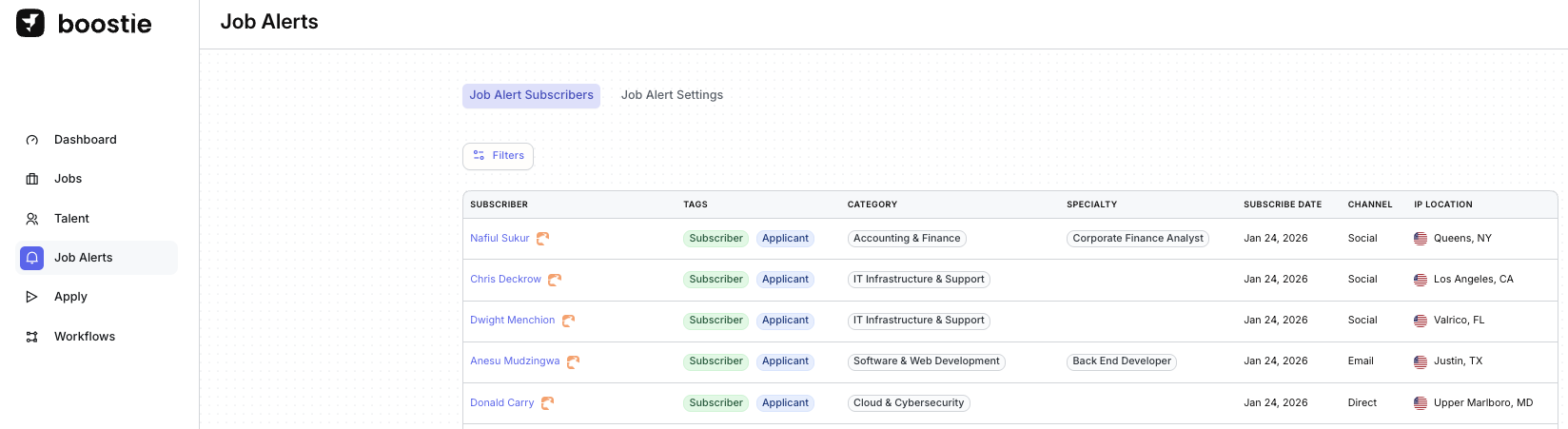
This page gives you a real-time feed of every new Subscriber Boostie has captured through your job alert pop-ups.
You’ll see:
- Subscriber Name
- Tags (Subscriber / Applicant)
- Assigned Category
- Subscribe Date
- Channel (where they signed up)
- IP Location
This is your top-of-funnel engine — every person here is someone who expressed interest before applying, giving your team the chance to nurture them early.
Step 2 — Filter Your Subscribers
Click Filters to segment your subscribers by:
- Category
- Specialty (if enabled)
- Candidate ID
- Name

Step 3 — Understand Subscriber Tags
Each subscriber has Boostie generated tags that help you immediately classify them:
- Subscriber → They opted into job alerts
- Applicant → They submitted an application
- Many subscribers are both, meaning Boostie captured them before they applied - the ideal funnel flow.
Step 4 — Click Into a Subscriber to View Their Profile
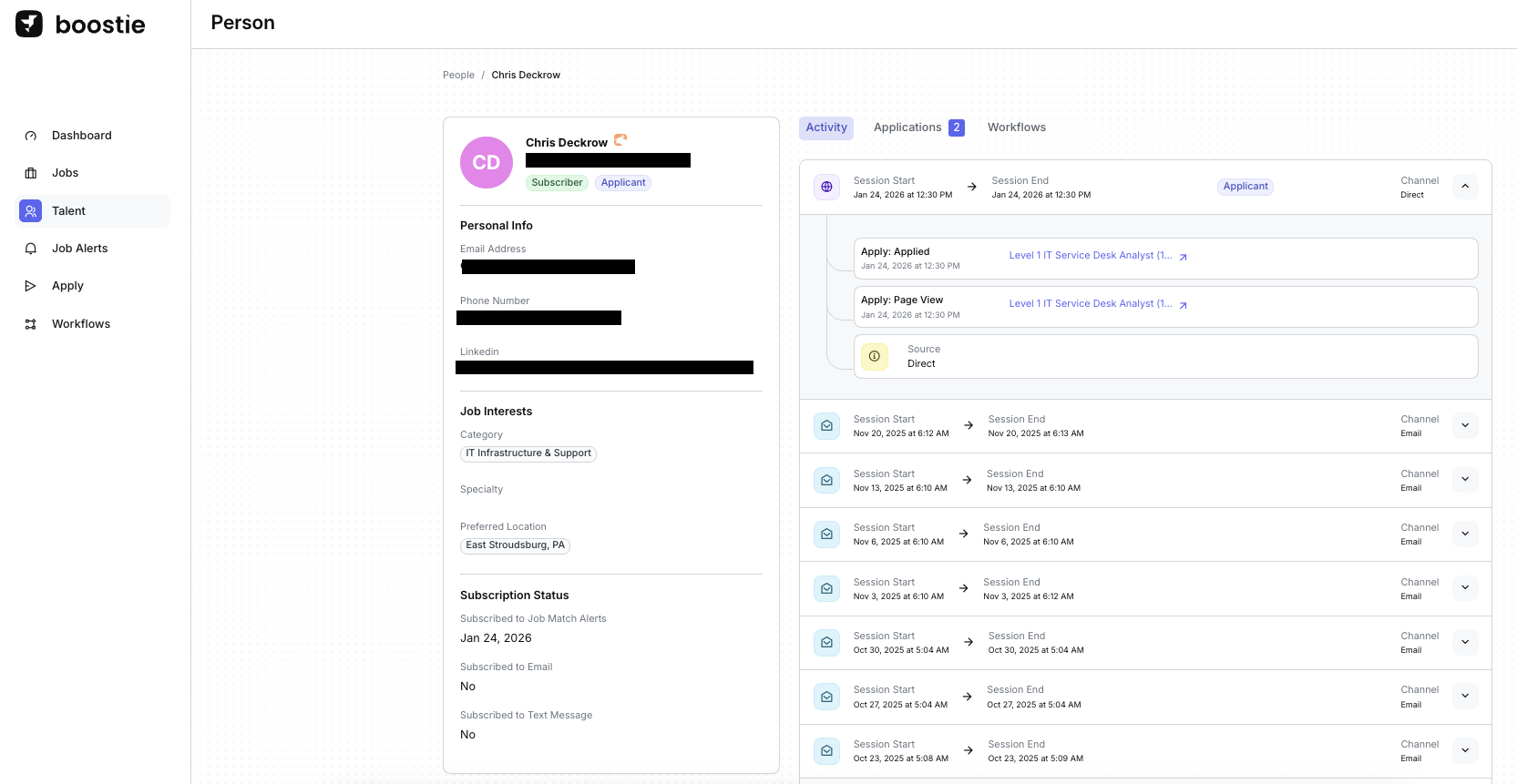
Selecting a subscriber’s name opens a detailed Person Profile.
This is where Boostie transforms raw signups into marketing-ready-friendly candidate insights.
This allows your team to search, segment, and export talent based on their expressed interests - not just past applications.
Step 5 — What You See in the Subscriber’s Profile
A. Personal & Contact Information
Boostie pulls in:
- Phone number
- LinkedIn (if captured)
- Subscriber vs. Applicant status
This shows you whether someone is just browsing or actively applying.
B. Job Interests Captured Through Boostie Job Alerts
Directly from the pop-up form, Boostie stores:
- Category of interest
- Specialty (if configured)
- Preferred Location
This allows your team to search, segment, and export talent to your ATS based on their expressed interests - not just past applications.
C. Subscription Status
This section shows whether the person is currently subscribed to:
- Job Match Alerts
- Email notifications
- Text messages
Along with:
- The date they subscribed
- Whether they opted in via email or SMS
This helps diagnose whether someone is still reachable through alerts.
D. IP Address & Device Information
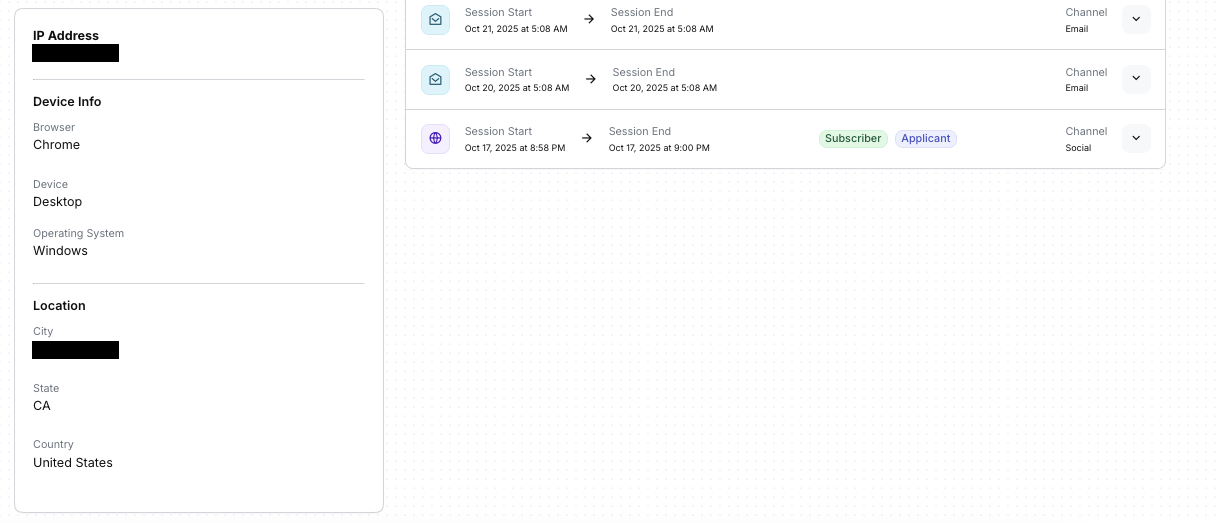
Boostie logs:
- IP address
- Browser
- Device type (mobile/desktop)
- Operating system
- Geographic location (City, State, Country)
These insights help you understand:
- Whether the user is browsing at home, on mobile, or at work
- Where interest in your jobs is coming from geographically
- How to optimize campaigns for device behavior
E. Full User Activity Timeline
This is one of the most powerful parts of Boostie Job Alerts.
You’ll see every recorded session, including:
- Page Views (Apply page, job details page, etc.)
- Applied events with timestamps
- Channels, Medium, and Source
- Job titles they interacted with
- Session start/end times
This turns a simple subscriber into a behaviorally rich prospect profile, similar to how e-commerce tracks buyer activity.
F. Application History
In subscriber’s Activity tab - and by further clicking on the Applications tab, Boostie displays their full Application History. This creates a unified view of a candidate’s full journey - from first interest → to subscriber → to applicant. This section shows every job they’ve applied to, along with:
- Job Title
- Apply Date
- Fit Signal (how well their background aligns with the role)
- IP Location
- Spam Indicator (if applicable)
- View link to see the full application journey
- Job link to see the job in Boostie or clicking the ATS logo to see the job in the ATS
If you see the SPAM badge next to an application, Boostie has flagged this submission as potentially fraudulent or low-quality before it reaches your recruiters - and most importantly your ATS (although you always have the option to push spam candidates into the ATS). The Fit Signal will still display so your team can quickly evaluate whether it’s a false positive or a truly low-value submission.
Step 6 — Understanding Spam Indicators in Boostie
Boostie helps protect your team from bad data and low-intent traffic by automatically identifying suspicious applications. When we detect patterns associated with spam behavior, we surface a SPAM badge directly inside the applicant's history (as shown in the screenshot).

This helps your team:
- Avoid wasting recruiter time on junk submissions
- Maintain the integrity of your talent funnel
- Keep analytics clean (applications, conversion rates, Fit Signals, etc.)
- Spot repeat offenders tied to the same IP, device, or location
How Boostie Detects Potential Spam
Without exposing proprietary logic, Boostie looks at signals such as:
- Unusual submission velocity
- Mismatched IP geolocation
- Disposable or suspicious email domains
- Automated browsing or apply behavior
- Large clusters of identical submissions
When these indicators stack up, Boostie flags the application so your team doesn’t have to sift through noise. This aligns with Boostie’s core promise: faster, cleaner, higher-quality pipelines that reduce manual work for recruiters.
Why This Matters
High-volume apply flows attract noise, especially when your job traffic scales. Boostie’s built-in spam filtering ensures recruiters only engage with people who genuinely match and matter. It keeps dashboards clean, improves data accuracy, and frees your team to focus on real talent - not junk submissions.
As your Subscriber base grows, ensuring the integrity of your talent funnel becomes even more important. Boostie automatically flags low-quality or suspicious signups with a Spam badge to protect your team’s time and ensure clean, accurate analytics.
For a deeper look at how Boostie identifies and filters spam across your funnel, check out the full SPAM Filtering Guide here.