
Weekly Recap Email: Automated Performance Summary
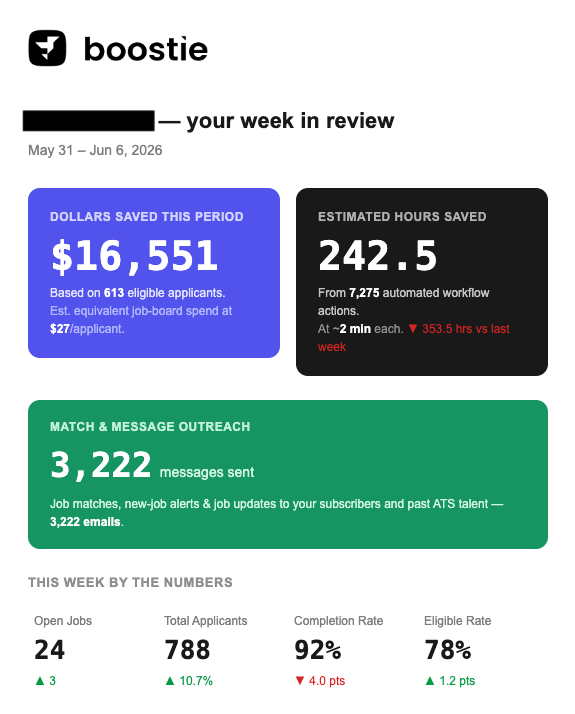
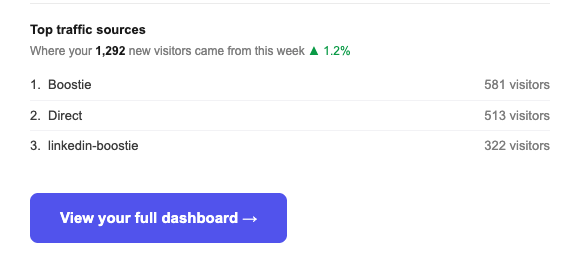
Boostie automatically sends your Primary Contact a Weekly Recap Email every week covering the previous seven days of activity. The email leads with your biggest wins — dollars saved, hours saved — and fills in candidate outreach volume, new hires, applicant stats, and top traffic sources, each with a week-over-week comparison. No setup required; it arrives on its own and links directly back to your full dashboard.
Who receives it
The recap is delivered to the Primary Contact Email configured under Settings → Company Settings → Corporate Details. If no primary contact email is set, no email is sent. The recap is on by default for all accounts.
What the email includes
Each section is data-driven and only appears when there is activity to show — sections with nothing to report are automatically hidden.
- Dollars Saved — eligible applicants from the week multiplied by the estimated job-board cost per applicant, shown with a week-over-week delta. Hidden if zero.
- Hours Saved — automated workflow actions multiplied by the estimated time per action, with a week-over-week comparison. Hidden if zero.
- Match & Message Outreach — total candidate messages sent by your Match & Message workflows (job alert emails and texts, Rediscovery, Job Published, Job Closed), broken down by channel. Hidden if no messages went out.
- New Hires — a celebratory callout showing the number of placements recorded during the week. Hidden if zero.
- By the Numbers — open jobs, total applicants, application completion rate, and eligible applicant rate, each with a week-over-week delta. Hidden if no applicants came in.
- Top Traffic Sources — your top three referrers and total new visitors to your career site that week, with a week-over-week comparison. Hidden if no traffic data.
If neither Dollars Saved nor Hours Saved has any value for the week — meaning no eligible applicants and no workflow actions — no email is sent for that cycle.
The subject line reflects the week's standout result: a new-hire celebration, dollars or hours saved, or a generic recap if no hero metric reached a non-zero value.
Managing the setting
To turn the weekly recap off (or back on):
- Click your name in the top-right corner of Boostie and select Settings.
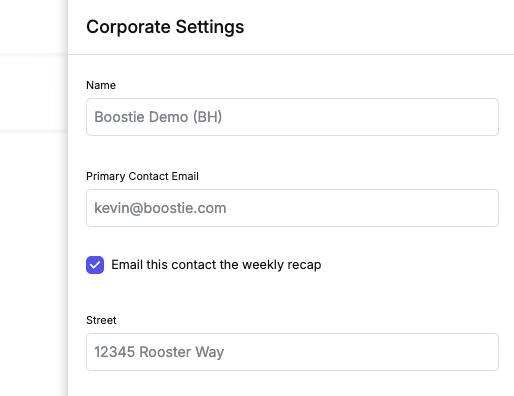
- In the Company Settings tab, find the Corporate Details section and click Edit Corporate Details.
- Check or uncheck Email this contact the weekly recap.
- Click Save.
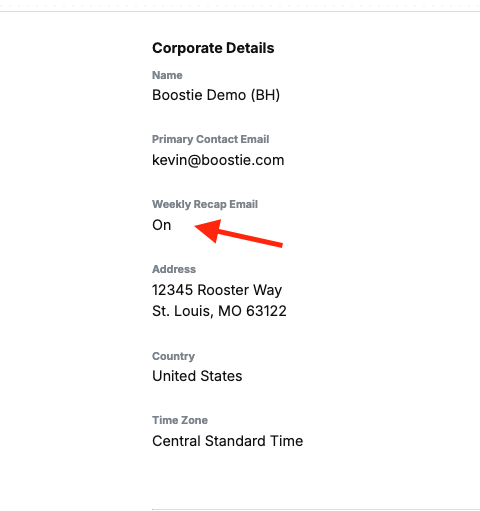
The current state (On or Off) is shown in the Corporate Details read view under Weekly Recap Email.
Why It Matters
The Weekly Recap gives your team a zero-effort record of what Boostie delivered each week — dollars and hours saved, candidate engagement volume, pipeline health — without needing to log in and check the dashboard. It's ROI visibility delivered to your inbox automatically, every week.