
ATS Candidate Ownership: View & Take Ownership
What Is ATS Candidate Ownership?
Boostie syncs the recruiter assigned to each job, candidate, and applicant from your ATS and displays that owner by name throughout the platform. Where supported, a recruiter can click Take Ownership to assign themselves as the candidate's owner in both Boostie and the ATS simultaneously.
Where Owner Information Appears
Once your ATS data sync has run, owner names show automatically in three places with no extra setup:
- Job detail page: the assigned recruiter's name appears beneath the job's ATS ID and publish date.
- Candidate (job seeker) profile: the owner appears in the profile's details panel, with a Take Ownership link alongside when applicable.
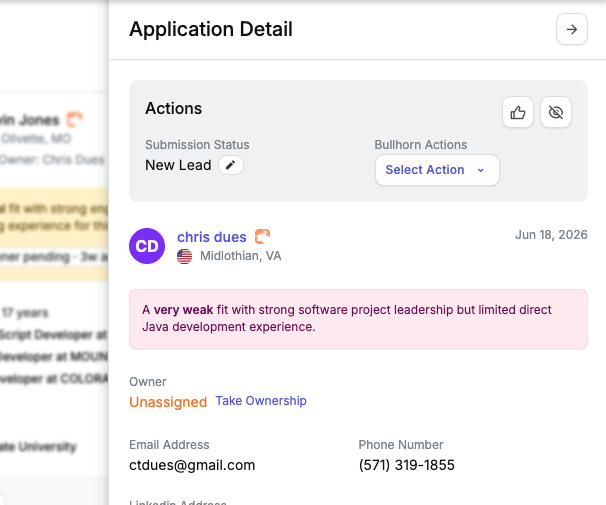
- Applicant card and applicant drawer: an owner line appears on each applicant card in card view and in the slide-out detail panel, with a Take Ownership link when applicable.
If no owner is recorded in the ATS for that record, the field shows Unassigned.
The owner shown on applicant cards and in the applicant drawer is the candidate owner, meaning the recruiter who owns the underlying job seeker record in your ATS. This keeps the name consistent across all of a candidate's applications, even when multiple submissions exist.
How Owner Data Gets Into Boostie
Boostie pulls your ATS recruiter roster and resolves the owner on each job, candidate, and applicant during every scheduled sync, roughly every 30 minutes. No manual configuration is required. The owner display updates automatically on each run.
Supported ATS integrations: Bullhorn, Tracker, Spott, and Loxo. Lever does not include owner sync at this time.
Taking Ownership of a Candidate
The Take Ownership link appears next to the owner field on the candidate profile page and inside the applicant drawer. Clicking it makes you the owner in both Boostie and your ATS. The owner field updates on the page immediately with no reload required.
Requirements
- Your Boostie account must be linked to your ATS user. Boostie matches your Boostie login email against the recruiter roster synced from your ATS. Until that match resolves, the Take Ownership link stays hidden. Matching runs automatically each sync cycle, so it populates without any action on your part once the roster sync has run.
- You cannot take ownership when you are already the owner. The link hides when your ATS ID matches the current owner's.
- Take Ownership requires Bullhorn, Tracker, Spott, or Loxo. It is not available on Lever accounts.
Switching Between Clients
If your Boostie login has access to multiple client accounts, your ATS link re-resolves automatically when you switch clients. Boostie refreshes the link in the background before redirecting you, so Take Ownership reflects your new client context right away.
Why It Matters
Seeing who owns a job or candidate directly in Boostie eliminates the round-trip to your ATS to check assignment. Take Ownership lets a recruiter claim an unassigned or re-routed candidate without leaving Boostie, and the ATS reflects the change immediately so your whole team stays aligned.
Best for: teams that hand candidates between recruiters mid-process, or account managers who need to confirm or claim ownership quickly before engaging a client contact.