
General Application: Capture Candidates Without a Specific Job Posting
Jobs → General Application
The General Application is a permanent, always-open apply form that lets candidates express interest even when no specific role fits. It sits at the top of your Jobs list and gives your team a consistent place to capture talent from referrals, inbound interest, and candidates who find your brand between open roles.
Unlike a regular posting, the General Application isn't tied to any ATS job. Candidates fill out the same apply experience, but there's no job title match, no fit score, and no advanced screener. The submission lands in your Applicants tab, ready to connect to a real role when the right one opens.
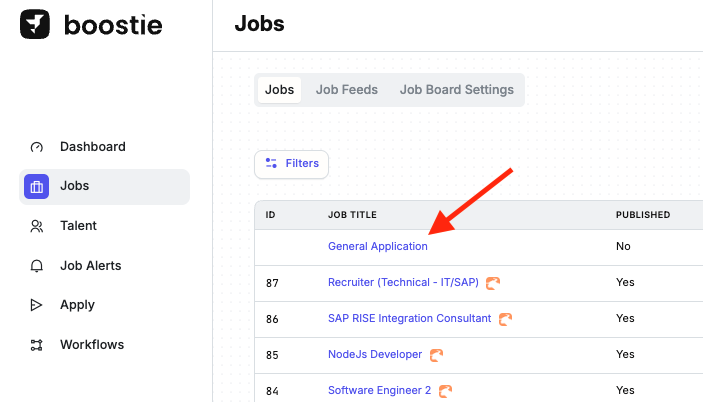
Finding the General Application
Go to Jobs in the left-hand navigation. The General Application is pinned at the top of the list, above all other jobs. If you apply a filter that doesn't match General Application, it will be hidden until you clear the filter.
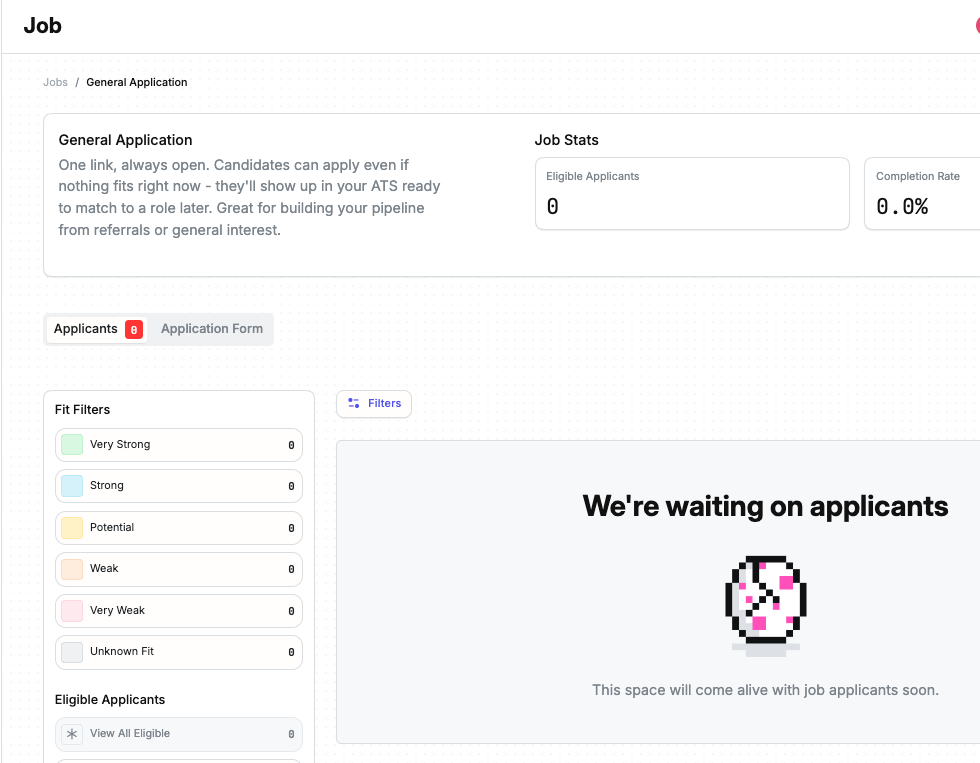
Click the row to open the detail view. You'll see two tabs:
- Applicants - every candidate who has applied through the General Application
- Application Form - the questions and personal information fields applicants see
The Job Page and Talent Pool tabs are not shown for the General Application - they don't apply to a job-less form.
Sharing the Apply Link
The apply link for the General Application is available from its detail view in Jobs. Share it on your website, in email signatures, on social posts, or anywhere you want to capture general candidate interest. The link stays active permanently - it doesn't expire or close when a role fills.
The Candidate Experience
Applicants see a standard Boostie apply page with General Application shown in place of a job title. The form uses your All Jobs rule - the same baseline questions and personal information fields every other job inherits. Job-specific rules do not apply to the General Application.
There is no fit score and no advanced screener. The application is captured the moment the candidate submits, with no background scoring process running afterward.
What Gets Pushed to Your ATS
Boostie creates the candidate record and posts an answers note to your ATS. Because there's no job to link, no job submission, opportunity, or application record is created. The exact behavior varies by ATS:
- Bullhorn - Candidate record created or matched; answers note added to the candidate. No job submission created.
- Loxo - Person record created or matched; note added to the Person only. No Candidate job-link record created.
- Tracker - Resource record created or matched; note added. No OpportunityResource created.
- Spott - Candidate record created; candidate-only note added. No Spott application created.
- Lever - Not pushed to Lever. The applicant is captured in Boostie only.
- No ATS - Captured in Boostie only, visible in the Applicants tab.
What You Can and Cannot Do
The General Application is managed by Boostie and cannot be edited or deleted. To change which questions or fields general applicants see, update your All Jobs rule under Apply → Job Apply Rules. The General Application inherits that rule and no others - job-specific rules never apply here.
Because there's no job to score against, general applicants do not receive a Fit Signal and are not eligible for the Advanced Screener. Workflows also exclude general applicants, so they won't appear in job-alert matching, rediscovery, or job-published runs.
The stats panel on the General Application shows Eligible Applicants only. Job Views and Days to First Eligible are not shown.
Why It Matters
Most recruiting funnels lose candidates who arrive between open roles. The General Application closes that gap. A single permanent link keeps your pipeline growing even when nothing specific is available. Referrals, social traffic, and inbound interest land somewhere useful instead of bouncing. When the right role opens, the talent is already there.