
Reactivate Workflow: Automated Re-Engagement & Job Match Opt-In
Your ATS holds years of candidate relationships - people who were sourced or applied long before your Boostie account existed. The Reactivate workflow reaches out to those imported candidates, asks whether they want to receive job match emails, and enrolls the ones who say yes into your active job alert audience. Boostie creates it automatically for your account - no setup required.
Who Gets the Email
Reactivate targets imported ATS candidates who meet all of the following at the time each send runs:
- Not yet subscribed to job alerts
- Not opted out of match-and-message emails
- Sourced from an ATS sync, not from a Boostie Apply, Boostie Capture, or job board signup
As soon as a candidate responds, either way, they are removed from the Reactivate audience and will not receive another send.
Sending Cadence
Reactivate sends in two phases:
- Bi-weekly, up to 3 times - the first three sends go out every two weeks.
- Every 3 months, indefinitely - candidates who still have not responded continue to receive a check-in roughly every four months.
The initial send is staggered across a 20-day window so the full audience does not land on the same day.
What Candidates See
The email arrives with the subject line Do you still want to receive job matches? and presents two choices: Yes, keep them coming and No thanks.
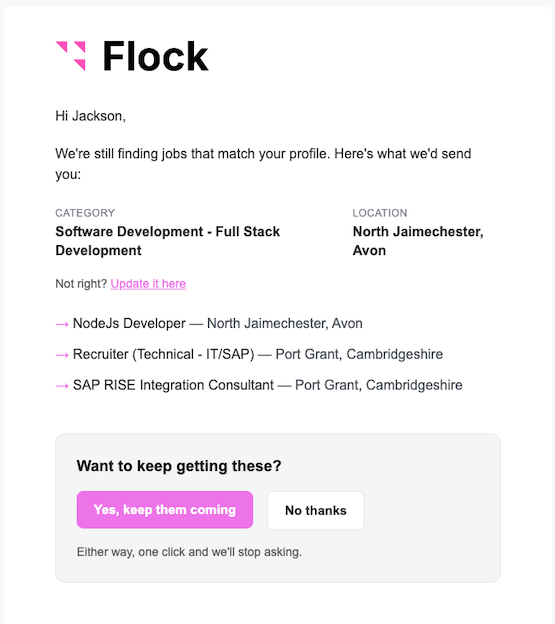
When a candidate clicks either button, a confirmation page asks them to tap once more before the response is recorded. This extra step prevents automated email scanners, which may load links in the background, from accidentally triggering an opt-in or opt-out on a real person's behalf.
Yes - Subscribe to Job Matches
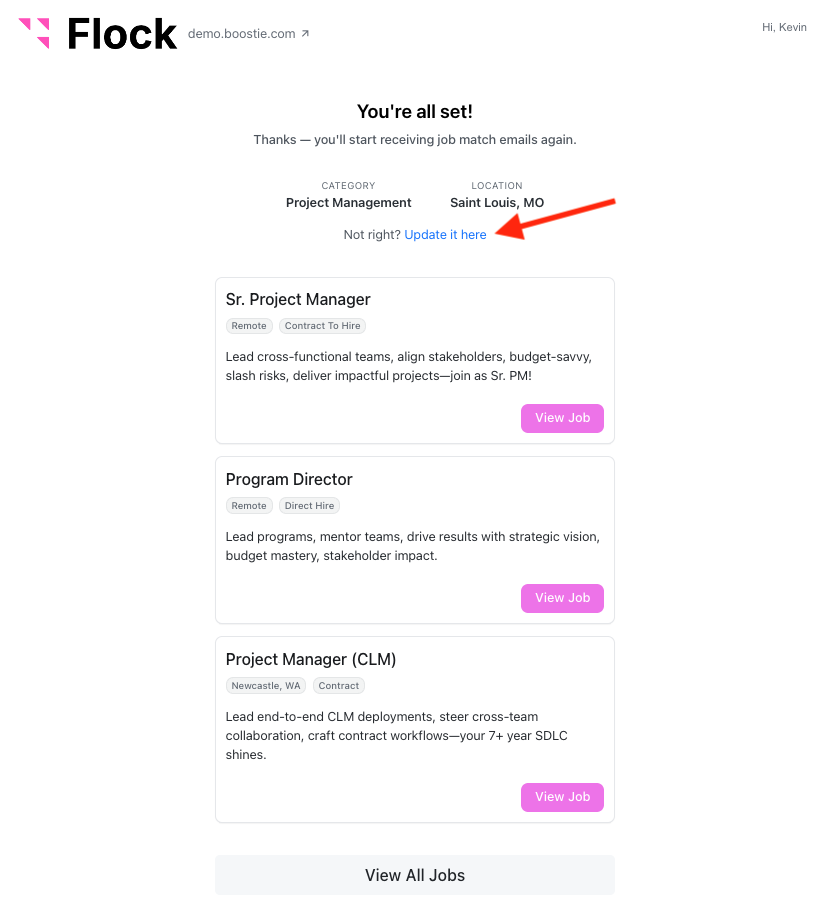
The candidate is subscribed to job alerts. On the next workflow run they are added to the Job Alert Subscribers email audience and will start receiving job match emails. Their confirmation page shows their job preferences - category, specialty, and location - alongside a list of currently matching jobs. If those preferences look off, a link lets them update their profile directly.
No - Opt Out of Job Match Emails
The candidate is marked as opted out of match-and-message emails. They will not receive the Reactivate email again, and they are excluded from all match-and-message workflows: Job Alert Subscribers sends, Job Published candidate notifications, Job Closed applicant messages, and ATS candidate matching sends. Other Boostie emails, such as application confirmations, are not affected. The opt-out page requires no login - the No link works anonymously.
No Response
Candidates who do not click either button remain in the workflow and receive the next Reactivate email per the cadence above.
Workflow Stats
Open the Reactivate workflow from Workflows to see response metrics alongside standard send and open counts:
- Reactivated - candidates who clicked Yes, shown as a count and as a percentage of emails sent.
- Declined - candidates who clicked No, shown as a count and as a percentage of emails sent.
A response is attributed to the Reactivate send it followed within 14 days, consistent with how other workflow applies are counted.
[SCREENSHOT: Reactivate workflow card showing the Reactivated and Declined counts with their percentage rates]
Individual candidate responses also appear in the Talent session activity view - a Reactivated or Declined tag shows on the session where the candidate clicked.
The Rediscovery Workflow
You may see a workflow labeled Rediscovery - Archived in your Workflows list. This is the predecessor to Reactivate. It is inactive and cannot be re-activated. The Reactivate workflow now handles re-engagement for imported candidates.
Why It Matters
Sending job match emails to candidates who do not want them hurts deliverability and wastes outreach budget. Reactivate solves this by converting your passive ATS database into an audience that has actively said yes. Every candidate who reaches your job alert programs through Reactivate is opted in by their own choice - keeping your sends relevant and your sender reputation clean.