
Advanced Screener: Voice Screener Scoring & Results
The voice screener in Boostie now delivers a single, clear outcome for each candidate instead of a multi-dimension grade. After a candidate completes a voice screener, recruiters see one of the following results in the applicant drawer on the Apply tab.
Screener Outcome Types
- Voice screener confirms this fit — the screener reinforces the candidate's existing Fit Signal. The fit tier (for example, very strong or strong) matches their score from the original application.
- Voice screener suggests a stronger fit — the screener surfaced positive signals indicating the candidate is a better match than their initial Fit Signal suggested.
- Voice screener suggests a weaker fit — the screener revealed concerns indicating the candidate is a weaker match than their initial Fit Signal suggested.
- Voice screener incomplete — the candidate did not complete the screener.
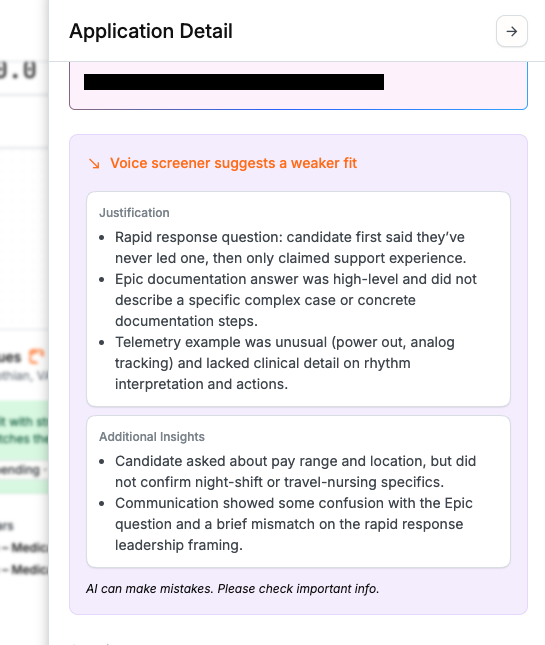
Justification & Additional Insights
Below the outcome, graded results display two sections:
- Justification — bullet points explaining the reasoning behind the outcome.
- Additional Insights — bullet points highlighting relevant information from the screener that was not captured in the original application or score.
These sections only appear when Boostie AI has content to surface. A note below graded results reads: AI can make mistakes. Please check important info.
For setup and question configuration, see Advanced Screener: Setup & Question Configuration.