Scott Berkson
Last updated: 27 February 2026
Boostie Workflows are simple, automated plays that keep candidates engaged, whether they’re job alert subscribers, website visitors, or existing ATS talent, without your team lifting a finger.
Where to find them: In the Boostie app, click Workflows in the left-hand navigation.
Important note: These workflows are built-in and hardcoded by the Boostie dev team, and aren’t available for client configuration.
We’ll be rolling out new Workflows over time, so stay tuned for more good stuff.
Use Boostie Workflows when you want to keep candidates moving - without adding manual steps for recruiters.
They’re ideal for:
Always-on candidate engagement: Stay in front of job seekers with scheduled job alerts via email and text.
Recovering lost applies: Nudge candidates who started an application but didn’t finish.
Improving applicant experience: Confirm submissions instantly and set expectations for next steps.
Re-activating your ATS database: Bring past candidates back into the funnel with Rediscovery campaigns tied to real openings.
Keeping job data polished: Automatically refresh job summaries in the ATS so postings look clean, consistent, and easy to read.
Closing the loop when roles fill: Redirect applicants from closed jobs to similar open roles (when the Job Closed workflow is active).
Bottom line: if you want more applies, better engagement, and a smoother experience - Workflows are the “set it and forget it” engine.
Each workflow appears as a card with:
Status: Active (green dot) or Inactive (red dot)
Channel: a badge like Email or Text Message
Volume counters (varies by workflow): e.g., Active Members, Applicants, Closed Jobs
Performance stats (when applicable):
Sent – messages delivered
Opens – emails opened (email workflows only)
Clicks – link clicks
Applies – tracked applies attributed to the workflow
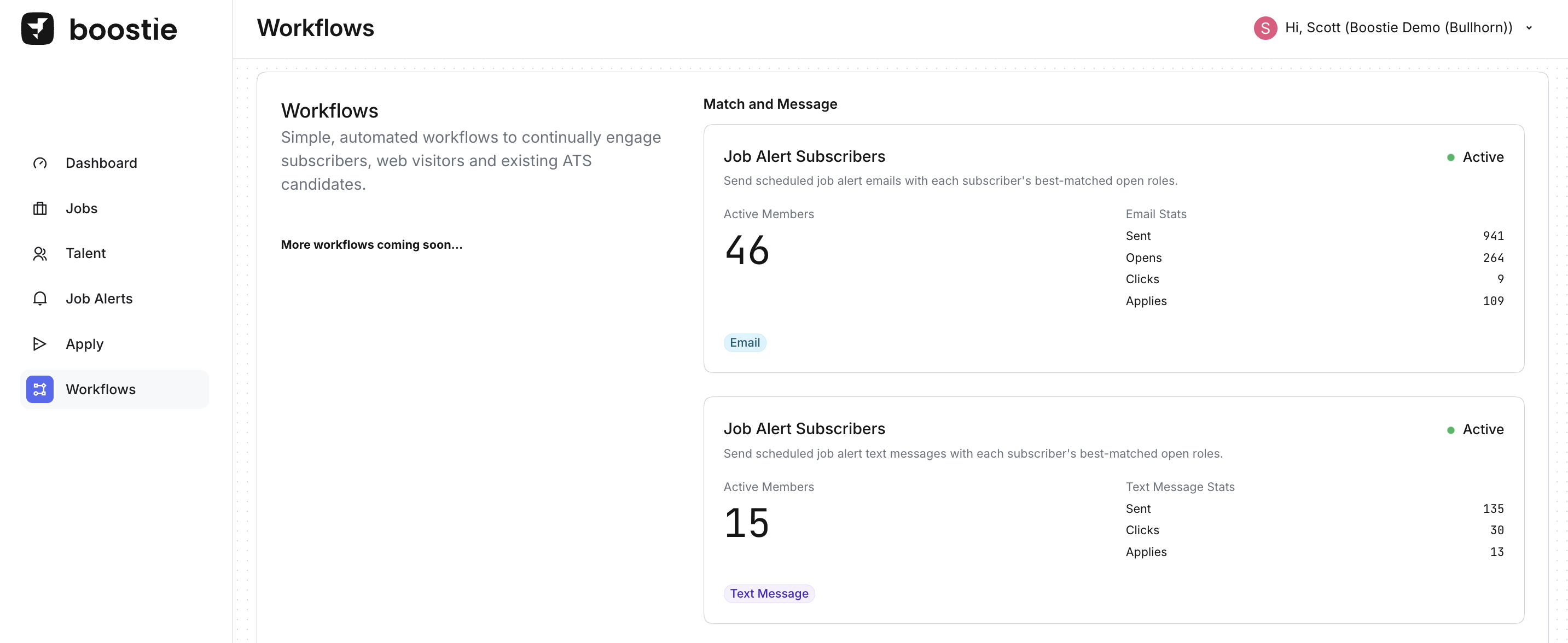






What it does: Sends scheduled job alert emails containing each subscriber’s best-matched open roles.
Best for:
Turning job alerts into a “set it and forget it” engagement engine
Increasing apply volume from warm, opted-in subscribers
Keeping your brand in front of candidates between recruiter touch points
What you’ll see on the card:
Active Members – the number of subscribers currently receiving alerts
Email Stats – Sent, Opens, Clicks, Applies
What it does: Sends scheduled job alert text messages with each subscriber’s best-matched open roles.
Best for:
Faster engagement and higher immediacy than email
Reaching mobile-first candidates
Driving quick click-to-apply behavior
What you’ll see on the card:
Active Members
Text Message Stats – Sent, Clicks, Applies (no Opens for SMS)
What it does: Re-engages past ATS candidates by emailing them about new job opportunities.
Best for:
Unlocking value from your ATS database (your best source of hires)
Reactivating silver medalists and past applicants
Filling roles faster with candidates who already know you
What you’ll see on the card:
Active Members – the audience currently being re-engaged
Email Stats – Sent, Opens, Clicks, Applies
What it does: When a job closes, Boostie can notify applicants who applied and weren’t placed, and point them to similar open jobs.
Best for:
Keeping rejected/closed-loop candidates warm
Redirecting intent to other roles instead of losing the candidate
Protecting your brand with clear, proactive communication
What you’ll see on the card:
Closed Jobs – number of closed jobs processed
Applicants – number of applicants included
Email Stats – Sent, Opens, Clicks, Applies
Status shows Inactive when not running
What it does:
Triggers when a job is published
Finds the best-matching job seekers for the new role
Sends an email notification to drive fast awareness and applies
Automatically controls send volume so each job emails 10–100 job seekers (based on eligible job seekers ÷ published jobs)
Ensures candidates aren’t over-messaged (ex: unsubscribed candidates are excluded and a 3-day cooldown is applied)
Best for:
Getting instant traction the moment a role goes live
Hard-to-fill or high-priority jobs where speed matters
Teams that want an always-on “new job announcement” play without manual list building
Keeping candidate outreach balanced across multiple open jobs (without blasting the same people repeatedly)
What you’ll see on the card:
Status: Active/Inactive
Published Jobs: number of newly published jobs processed by the workflow
Job Seekers: number of job seekers selected to receive the email notification
Email Stats:
Sent – emails delivered
Opens – opened emails
Clicks – link clicks
Applies – tracked applies attributed to the workflow
Channel badge: Email
What it does: Sends a confirmation email to applicants to acknowledge submission and set expectations for next steps.
Best for:
Instant follow-up (no “did my application go through?” anxiety)
A more premium candidate experience
Reducing inbound “status check” messages
What you’ll see on the card:
Applicants – count of applicants who hit this workflow
Email Stats – Sent, Opens, Clicks, Applies
What it does: Follows up with candidates who started but didn’t finish applying, prompting them to complete the application.
Best for:
Recovering drop-offs and abandoned applies
Increasing apply volume without increasing ad spend
Re-engaging interested candidates who got interrupted
What you’ll see on the card:
Applicants – count of incomplete applicants captured
Email Stats – Sent, Opens, Clicks, Applies
What it does: Keeps your ATS job records polished by updating job summaries using Boostie’s AI-generated, formatted job summary.
Best for:
Making job descriptions easier to read and more consistent
Improving candidate experience (cleaner, clearer job content)
Reducing manual cleanup in the ATS
What you’ll see on the card:
Updated Jobs – count of jobs updated by this workflow
An Update Data action (used to trigger the update process)