Scott Berkson
Last updated: 24 January 2026
Boostie Apply Settings give you precise control over where Boostie Apply appears and which applicants make it into your ATS. This is where you activate Apply, fine tune visibility across your site, and protect your pipeline from bots, spam, and low-quality traffic.
From the left-hand navigation, click Apply.
You’ll land on Recent Applicants.
In the top navigation, click Apply Settings.
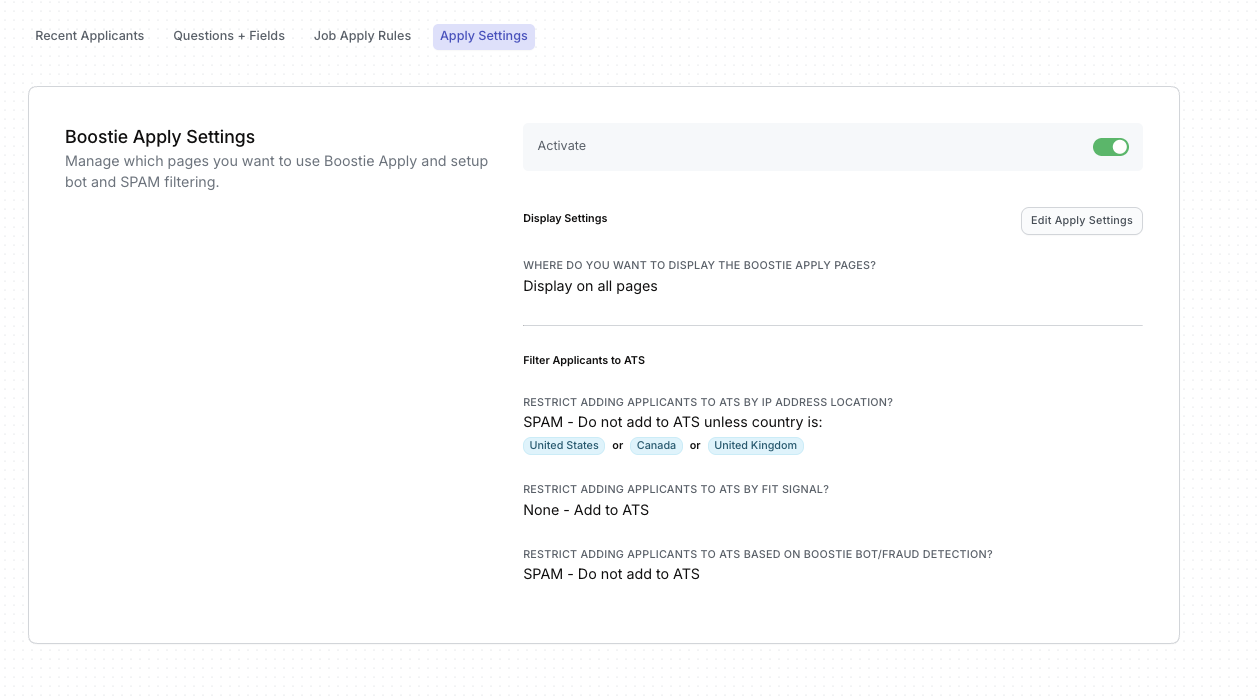
Before anything else, make sure Apply is turned on.
Toggle Activate to On (green)
When activated, Boostie Apply will follow the display and filtering rules you configure below.
If Apply is off, no apply pages will display and no applicants will be processed.
The main panel on the right gives you a read-only snapshot of your current configuration, including:
Where Boostie Apply is displayed
How applicants are filtered before reaching your ATS
Whether bot and fraud protection is active
This view is designed to give recruiters and admins quick clarity without needing to edit anything.
To make changes:
Click Edit Apply Settings
A slide-out panel appears where all configuration happens
Changes made here take effect immediately once saved.
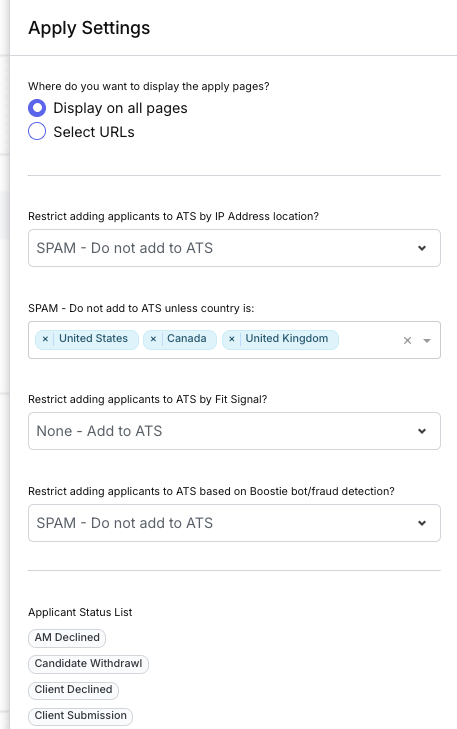
Choose how Boostie Apply is displayed across your website:
Display on all pages
Best for career-first sites or landing-page-driven traffic.
Select URLs
Display Apply only on specific pages or URLs.
You can match on URL terms to control exactly where Apply appears.
This gives you flexibility to support job boards, campaign pages, or custom career experiences without over-exposing Apply.
Boostie Apply helps protect your ATS by filtering applicants before they’re added.
Restrict by IP Address Location
Choose how Boostie handles applicants based on geographic location:
Allow applicants only from selected countries
Automatically mark others as SPAM – Do not add to ATS
This is ideal for blocking irrelevant or high-risk traffic at the source.
If you select SPAM filtering by location:
Add specific countries you want to allow
Applicants outside those countries will be flagged as SPAM and excluded from your ATS
This keeps your database clean without manual review.
Boostie Fit Signal helps assess applicant quality based on engagement and responses.
Choose whether lower-scoring applicants should still be added to your ATS
Or automatically mark them as SPAM – Do not add to ATS
This gives you an early quality gate without revealing proprietary scoring logic.
Boostie continuously monitors for bot and fraudulent activity.
Enable automatic SPAM handling for detected bot or fraud submissions
Block bad data before it ever reaches your recruiters
This protection runs in the background and requires no ongoing management.
Apply Settings are your control center for:
Cleaner ATS data
Fewer unqualified applicants
Better recruiter signal
A smoother, more intentional candidate experience
Set it once, refine as needed, and let Boostie do the heavy lifting.